
Virtual Fitting Rooms Vs Size Charts: Which Is Better For Your Online Store?

Welcome to your comparison guide. This post covers the difference between using virtual fitting rooms and size charts in an e-commerce fashion store. Understand how these features impact customer experience and make your store easier to shop.
What This Blog Is For
Think of this as your help manual for clothing fit technology. If you want to optimize your site, reduce returns, or simply provide a smoother shopping journey, this comparison is your blueprint.
The Basics: What Are Size Charts and Virtual Fitting Rooms?
Size charts and virtual fitting rooms are e-commerce tools. Both are designed to help shoppers figure out which clothes will fit best.
Size charts are tables with standardized measurements. Customers look at their own numbers and match them to the closest chart size.
Virtual fitting rooms are interactive features. Shoppers enter their body measurements, or even upload a photo, to generate fit recommendations or a virtual try-on preview.
Here’s how to find these options on most sites:
Look for “Size Guide” or “Sizing Chart” links on product pages.
Find virtual try-on buttons labeled “Try On” or “See It On Me,” often highlighted to encourage interaction.
How Size Charts Work
Size charts list chest, waist, hip, sleeve, and inseam measurements per size. Customers need to:
Measure themselves at home.
Match those numbers to the closest brand or product size on the chart.
Select the recommended size from the size menu.
This is your standard solution. But there are important limitations.
What to keep in mind:
Measurement systems vary. One brand’s medium may be another’s large.
Mistakes are common, customers may measure incorrectly or misread the chart.
Charts sometimes lack detailed fit info about fabric stretch, cut, or drape.
Shoppers often end up with clothes that don’t fit as expected, leading to higher return rates.
How Virtual Fitting Rooms Work
Virtual fitting rooms give your customers a digital tool to visualize fit before purchase. Here’s what happens:

The customer inputs their measurements manually, answers a few questions, or uploads a full-body photo.
The system uses AI to create a 3D avatar or overlay images of the garments on their photo.
Realistic recommendations are provided, such as “This medium fits snug on your shoulders” or “The large will have a roomier fit at the hips.”
Shoppers can preview the fit in real time or see how different sizes look side by side.
For VWEAR users, the VWEAR Virtual Fitting Room lets customers upload a quick pic from their smartphone, and then uses advanced algorithms to recommend the perfect size.
Key Differences at a Glance
Feature | Size Charts | Virtual Fitting Rooms |
Personalization | Low, generic recommendations | High, tailored to shopper’s body |
Error Risk | High, user must self-measure | Low: AI guides/automates the process |
Accuracy | Varies; no fabric/fit nuance | High; uses product and user data |
Return Rates | High: fit mismatches common | Lower: returns drop by 30%+ |
Customer Engagement | Passive; just a lookup | Interactive experience; “try on” fun |
Conversion Boost | Small | Significant with improved confidence |
Virtual Fitting Room Example
Let’s see what this functionality looks like for the customer.
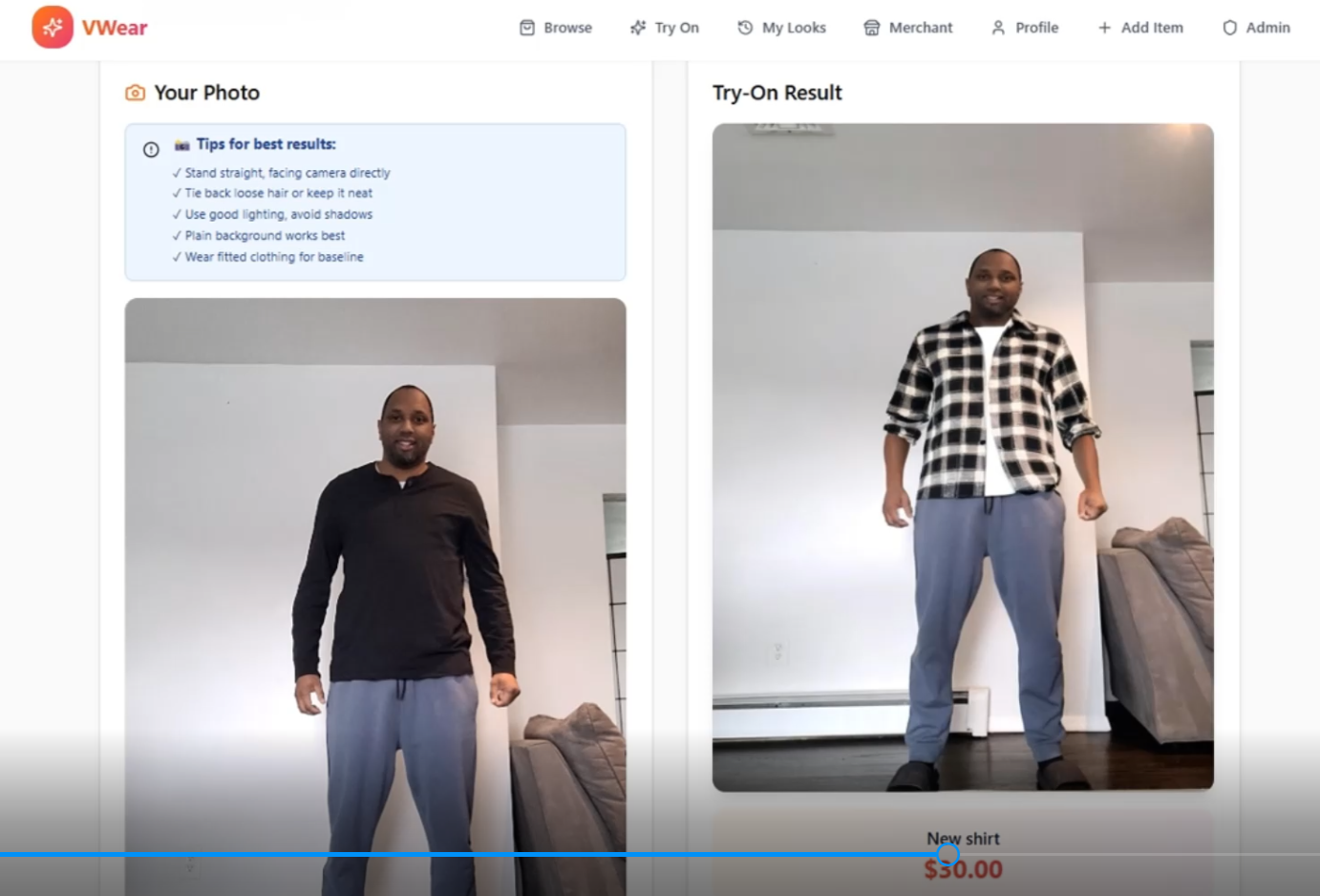
The customer stands in front of a blank wall, snaps a photo, uploads it, and selects a style.
The virtual fitting room overlays the shirt or dress on the image, giving a live fit preview.
Advanced fit prediction adjusts for fabric stretch, sleeve style, and the shopper's body type.
The customer can now see how a medium, large, or small would actually look without guessing.
This cuts back on uncertainty and makes the final purchase decision easier and faster.
Why Size Charts Are Still Needed
Virtual fitting rooms aren’t a magic switch. They depend on product data: such as garment measurements: being accurate and up-to-date. Here’s what you need:
Every product must have a digital sizing chart behind the scenes.
If a style is updated, remeasure and update the virtual fitting system.
Keep consistency between what’s in the size chart and what’s in the virtual fitting room overlay.
In other words, size charts lay the foundation for automated try-on experiences. Customers may still want to check the chart for reference or for reassurance.
Step-by-Step: How to Add Both to Your Online Store
Start with detailed, easy-to-read size charts. Make sure every product has up-to-date measurements in both centimeters and inches.
Implement a virtual fitting room (like VWEAR) that uses those measurements, plus visual data, to make fit predictions.
Guide your shoppers: Place both options side by side on product pages. Use callout boxes or pop-up help for explanations.
Promote in your store messaging: “Not sure about size? Try it on virtually or consult the chart: either way, we’ve got you covered!”
Encourage customers to interact. The more they use these features, the fewer returns you’ll face.
User Experience Tips
Make sure the “Try On” or “Virtual Fitting Room” button is visible above the fold.
Include explanations like: “Upload a full-body photo to see your perfect fit instantly.”
If a customer seems stuck, offer chat support or link to your Image Consultation Service for more guidance.
Which Is Better: Virtual Fitting Rooms or Size Charts?
If you’re choosing between these options for your store:
Virtual fitting rooms drive higher engagement, better fit predictions, and fewer returns.
Size charts are essential support material: they’re quick, easy, and provide confidence for those who don’t want to try on virtually.
Use both. Let your customers decide, but highlight the ease and accuracy of virtual try-on to encourage more engagement. When you combine both, you maximize inclusivity and minimize returns.
Visual Reference: Product Catalog With Virtual Try-On
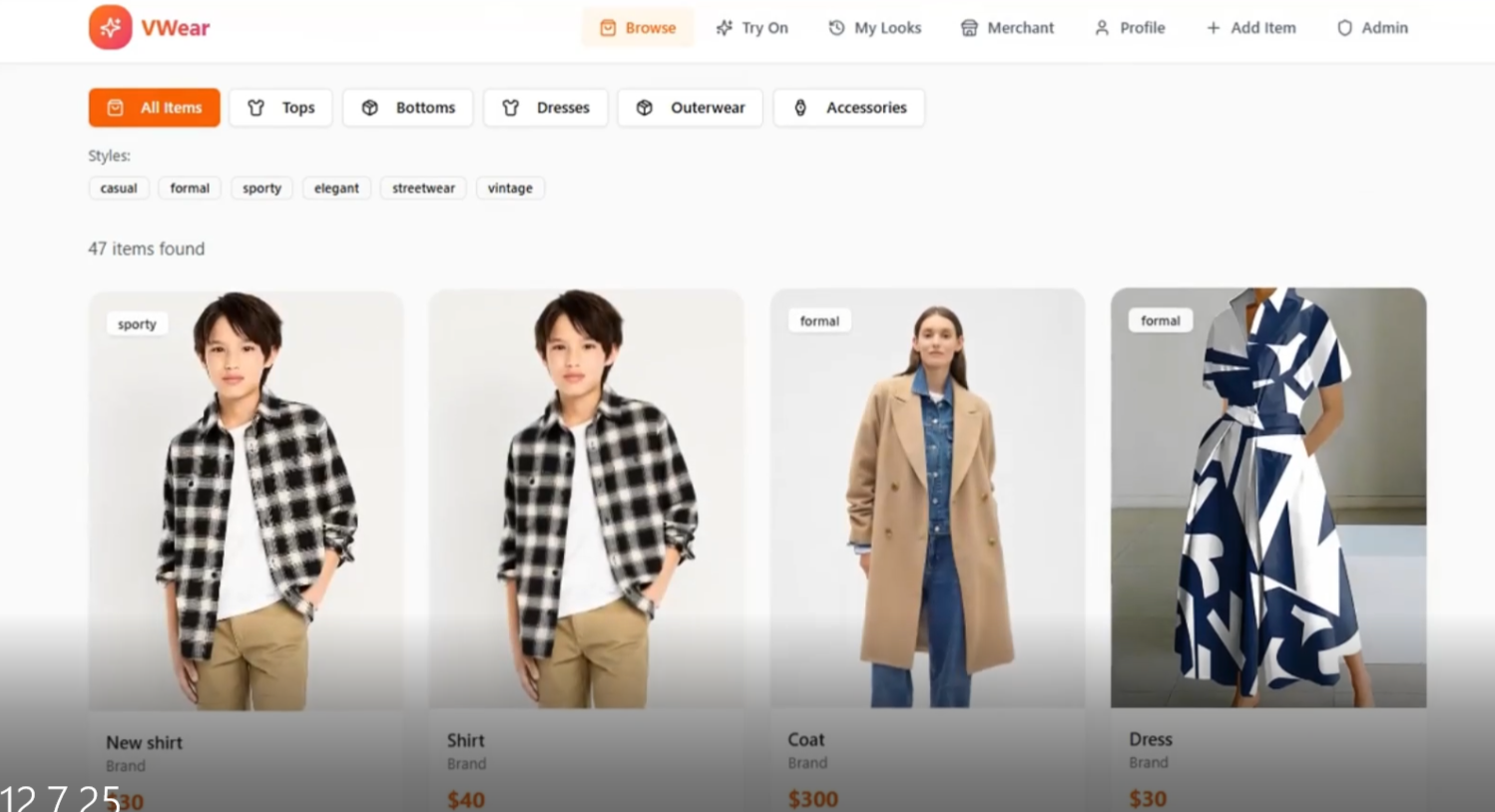
Products feature a “Try On” option right in the catalog: making shopping seamless.
Customers move from browsing to virtual try-on with one tap.
Sorting and filtering make it easy to compare styles and fits.
How Forums and Blogs Help
Your forum and blog space is a resource for continuous engagement. Use it to:
Post updates on how to use new sizing tech.
Offer return/fit advice in blog tutorials like this one.
Encourage feedback and questions so you know what features are working.
Pro tip: Make sure these sections are well organized. Link your visitors to blog posts and forum categories for easy navigation.
Wrap-Up: Maximize Fit Accuracy and Boost Sales
This is your actionable template:
Always provide both a detailed size chart and a virtual fitting room option.
Make your virtual fitting room easy to use: guide shoppers step by step.
Keep your product data accurate for trust and performance.
Use instructional content (like this!) to help users get the most from your technology.
Ready to give it a try? Visit VWEAR’s Virtual Fitting Room and see how fun and easy sizing can be!
Want to connect with your shoppers even more? Head over to the VWEAR forum and drop your fit questions or feedback. Happy fitting!
Comments